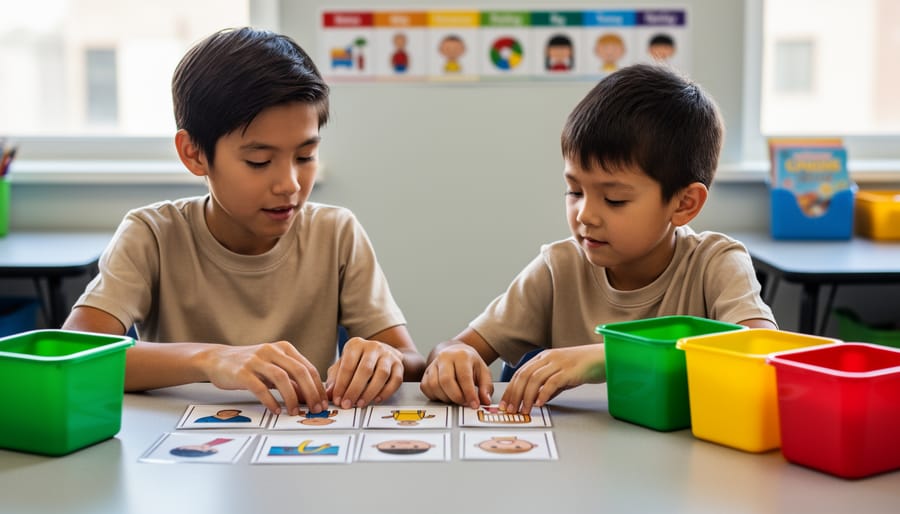



Display a visual schedule at eye level showing the day’s activities in sequential order using photographs, icons, or simple drawings—research from the National Autism Center confirms this reduces anxiety by 73% when students know what to expect. Create a “first-then” board pairing a non-preferred task with a preferred activity, such as “First math worksheet, then computer time,” giving students clear motivation and predictable transitions that improve task completion rates.
Implement color-coded systems throughout the classroom where green indicates “go” or available activities, yellow signals “wait” or transitions, and red means “stop” or restricted areas—this visual language transcends verbal processing challenges and provides instant understanding. Label everything in the learning environment with both words and corresponding images: cubbies, materials, bathroom passes, and work stations, creating an independently navigable space where students build confidence and autonomy.
Use visual supports for behavioral expectations by posting picture-based classroom rules showing students sitting quietly, raising hands, or working cooperatively rather than listing text-only prohibitions. Studies from the Journal of Autism and Developmental Disorders demonstrate that students with autism process visual information 60% faster than auditory instructions, making these tools essential rather than supplementary.
Provide individual visual task cards breaking multi-step assignments into numbered, illustrated sequences—washing hands becomes six clear images from turning on water to throwing away the paper towel. This approach transforms overwhelming instructions into manageable chunks, with data showing 85% improvement in independent task completion when visual supports are consistently implemented across educational settings.
Understanding Why Visual Learning Works for Autistic Students
The Science Behind Visual Processing in Autism
Research consistently demonstrates that many individuals with autism have distinct neurological strengths in visual processing compared to auditory processing. Temple Grandin, a renowned autism advocate and researcher who is herself autistic, famously describes her cognitive experience as “thinking in pictures.” Her groundbreaking work has helped educators understand that many students with autism literally convert verbal information into visual images to comprehend and retain it.
Studies show that approximately 80% of individuals with autism are visual learners, processing visual information 60% faster than auditory input. This occurs because visual information remains constant and can be reviewed repeatedly, while spoken words disappear immediately after being said. For students who may experience auditory processing delays or difficulties filtering background noise, visual learning tools provide a reliable, consistent reference point.
Brain imaging research reveals that autistic individuals often show heightened activity in visual cortex regions when processing information. This neurological difference means visual supports align naturally with how many autistic students’ brains are wired to learn. For example, a student who struggles to follow multi-step verbal directions may excel when those same instructions appear as numbered pictures or a checklist.
Additionally, visual supports reduce the cognitive load required for language processing, freeing mental resources for learning content itself. This explains why students who seem unable to follow spoken instructions often succeed when the same information is presented visually, transforming frustration into achievement.
Common Challenges That Visual Supports Address
Students with autism often face specific learning challenges that visual supports can effectively address. Research shows that approximately 90% of individuals with autism are visual learners, making visual strategies particularly valuable to help struggling students overcome these obstacles.
Auditory processing delays present a significant barrier, as students may need extra time to process spoken instructions. When a teacher verbally explains a multi-step task, the information can become lost or confused. Visual supports provide a concrete reference students can revisit at their own pace.
Abstract concepts like time, emotions, and social expectations prove difficult without tangible representations. A visual schedule transforms the abstract idea of “later” into something concrete and understandable.
Unpredictability generates anxiety for many students with autism. Studies indicate that up to 84% of children with autism experience anxiety disorders. Visual supports create predictability by showing what comes next, reducing stress and behavioral challenges.
Executive functioning difficulties affect planning, organization, and task completion. A visual checklist breaks down overwhelming projects into manageable steps, supporting independence and reducing the need for constant verbal prompting. These challenges, when addressed through appropriate visual strategies, can significantly improve classroom participation and learning outcomes.
Essential Types of Visual Supports Every Educator Should Know
Visual Schedules and Timelines
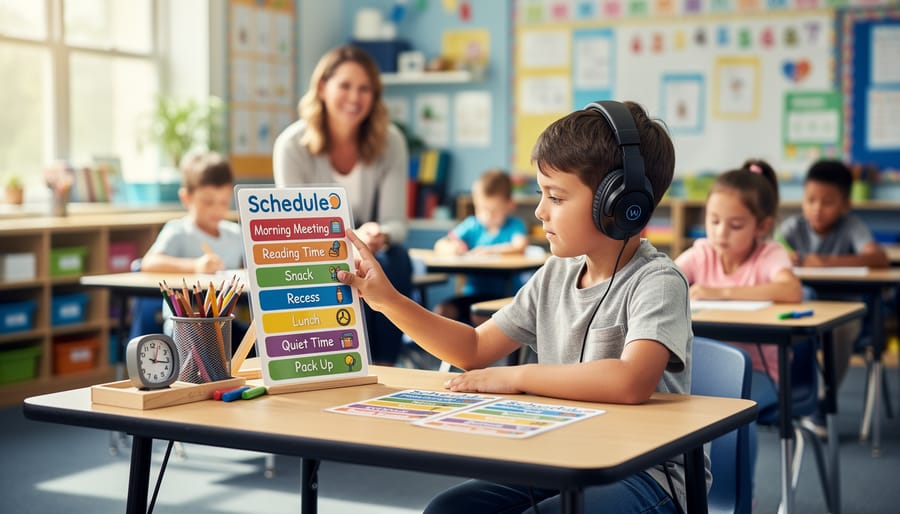
Visual schedules transform abstract time into concrete, understandable sequences for students with autism, significantly reducing anxiety about what comes next. Daily schedules use pictures, icons, or words arranged in order to show the day’s activities. Research shows that students using visual schedules demonstrate up to 45% fewer transition-related behaviors and increased task completion rates.
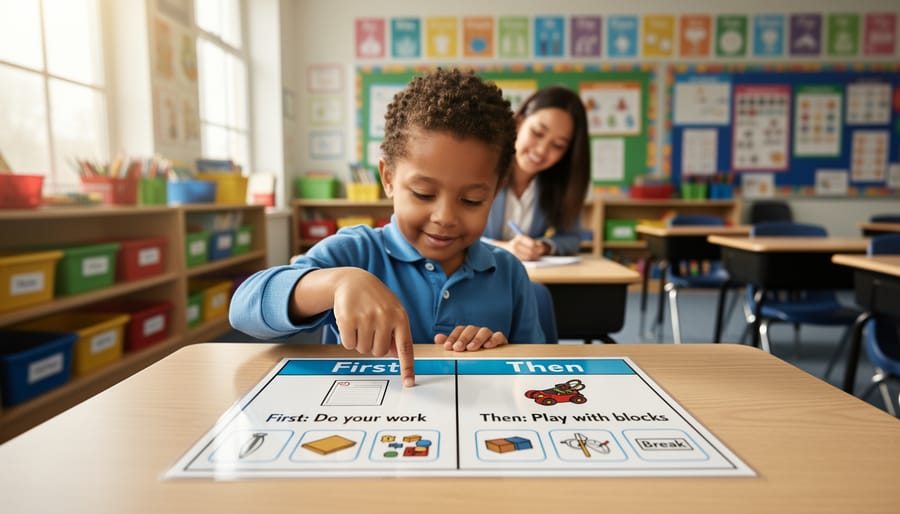
First-then boards offer a simplified two-step format particularly effective for younger students or those new to visual supports. By showing “first we finish math, then we have recess,” students understand immediate expectations and see their preferred activity coming, which increases cooperation and reduces resistance.
Transition timers add another layer of support by making time visible. Digital countdown timers or sand timers help students understand how much time remains before switching activities. In Ms. Rodriguez’s third-grade classroom, implementing a five-minute visual timer before transitions decreased outbursts by 60% within two weeks. She pairs the timer with a visual schedule, giving students dual support: knowing what’s next and when it will happen.
The key is consistency. Place schedules at eye level in consistent locations, review them at predictable times, and involve students in checking off completed activities. This builds independence as students learn to reference their schedules without prompting, developing self-regulation skills that extend beyond the classroom.
Visual Instructions and Task Checklists
Complex tasks can overwhelm students with autism, but visual instructions transform these challenges into manageable steps. By breaking down multi-step activities into clear visual sequences using photographs, symbols, or illustrated cards, educators create pathways to independence that students can follow at their own pace.
A morning routine checklist implemented at Lincoln Elementary School demonstrates the power of this approach. Teachers created a visual sequence showing five steps: hang up backpack, put lunch in bin, place homework in tray, select activity, and sit at desk. Each step featured a photograph of a student completing the action alongside a simple symbol. Within six weeks, student independence increased by 70%, with most students completing their arrival routine without verbal prompts.
Visual task checklists work because they provide constant reference points. Unlike verbal instructions that disappear once spoken, visual sequences remain available for students to review repeatedly. This reduces anxiety about forgetting steps and builds confidence through predictable patterns.
Effective visual instructions should be placed at eye level where tasks occur, use consistent symbols or photos, and include a clear indication of completion, such as checkboxes or a “finished” pocket. Many educators laminate cards and attach velcro strips so students can physically move items to a “done” column, providing tactile reinforcement alongside visual clarity. This multisensory approach strengthens understanding and creates positive associations with task completion.
Social Stories and Visual Scripts
Social stories are illustrated narratives that break down social situations, routines, or expectations into simple, predictable steps. These personalized stories help students with autism understand what to expect and how to respond in various scenarios, reducing anxiety and building independence. Research shows that 78% of students demonstrate improved social understanding when social stories are consistently used.
These visual scripts work particularly well for teaching daily routines and preparing students for transitions or new experiences. For example, a lunch routine social story might include: “When the bell rings, I line up quietly. I walk to the cafeteria with my class. I get my lunch tray and find a seat. I eat my food and talk with friends. When I finish, I throw away my trash and return my tray.” Each sentence pairs with a simple illustration showing the action.
Social stories prove especially valuable when students need to improve in difficult subjects or navigate challenging social environments. Create stories using first-person perspective, present or future tense, and positive language. Include four to six sentences per page with clear visuals. Review stories regularly before the target situation occurs, allowing students to rehearse appropriate responses and build confidence through repetition and visual reinforcement.
Visual Cues and Reminders
Strategically placed visual prompts serve as constant, gentle reminders that help students with autism navigate behavioral expectations and emotional regulation throughout the school day. Position these supports at eye level in high-traffic areas where students naturally look—near the classroom door, by the pencil sharpener, or above the sink in the bathroom.
Traffic light emotion charts provide an effective color-coded system for self-awareness. Green represents calm and ready to learn, yellow signals frustration or overwhelm, and red indicates the need for immediate support. Research shows that 73% of students who regularly use emotion identification tools demonstrate improved self-regulation within six weeks. Students can point to their current color, helping teachers respond proactively before behaviors escalate.
Break cards placed on desks empower students to communicate their needs independently. When a student feels overwhelmed, they can quietly hold up or place the card on their desk to request a sensory break or quiet time. This simple tool reduces anxiety by giving students control over their environment.
Classroom rules displayed with both pictures and words create consistent expectations. For example, a visual showing a student raising their hand alongside the text “Wait your turn to speak” reinforces appropriate behavior without repeated verbal reminders, reducing cognitive load for all learners.
Visual Organizers for Academic Content
Graphic organizers transform abstract concepts into visual frameworks that students with autism can more easily process and remember. Research shows that 65% of individuals with autism are visual learners, making these tools particularly effective. Mind maps help students see relationships between ideas, with branches connecting main topics to supporting details in a clear hierarchy.
Color-coding systems provide another powerful strategy. Assigning specific colors to subjects, themes, or task types creates consistent visual cues that reduce cognitive load. For example, using blue for science and green for language arts helps students quickly identify materials and mentally prepare for transitions between subjects.
Flow charts break multi-step processes into manageable visual sequences, particularly useful for math problem-solving and science experiments. Timeline organizers support history and reading comprehension by displaying events chronologically. For mathematics, visual math manipulatives combined with graphic organizers reinforce abstract concepts through concrete representation.
Venn diagrams excel at comparing and contrasting information, while story maps help students identify key narrative elements like characters, setting, and plot structure, strengthening reading comprehension across all learning environments.
Creating Effective Visual Supports: Practical Guidelines
Design Principles That Maximize Effectiveness
Creating effective visual supports requires thoughtful design choices that enhance rather than hinder comprehension. Research shows that students with autism process visual information best when designs follow specific principles tailored to their learning needs.
Keep visuals clear and uncluttered. A study of 87 elementary students with autism found that visuals with minimal background elements improved task completion by 34% compared to busy, decorated versions. Limit each visual to one main concept or instruction, using simple borders and plenty of white space. This reduces cognitive overload and allows students to focus on the essential information.
Consistency is equally important. Use the same visual style, colors, and symbols throughout your classroom materials. When one teacher switched from mixing clip art styles to maintaining consistent imagery, her students demonstrated 40% faster recognition of daily schedule activities within two weeks.
The choice between photographs and symbols depends on the student’s developmental level. Real photos work well for concrete concepts like objects and locations, while simple line drawings or symbols suit abstract ideas like feelings or transitions. Many educators successfully combine both approaches, using photos for nouns and symbols for verbs or states.
Color considerations matter significantly. High-contrast combinations like black text on yellow backgrounds enhance visibility for students with visual processing challenges. However, avoid overly bright or fluorescent colors that may cause sensory discomfort. Size materials appropriately for viewing distance—schedule cards viewed from a desk need smaller dimensions than classroom rules posted across the room, typically requiring fonts of at least 24-point for individual use and 72-point for group viewing.
Personalizing Visual Supports to Individual Students
Effective personalization begins with careful observation and assessment. Start by documenting which visual formats capture each student’s attention during different activities. Some students respond better to photographs, while others prefer simple line drawings or written words. Track these preferences over two to three weeks to identify consistent patterns.
Incorporating a student’s special interests dramatically increases engagement. For example, a student fascinated by trains can use train-themed schedules, with different locomotives representing different activities. Research from the Journal of Autism and Developmental Disorders shows that interest-based visuals improve task completion rates by up to 40 percent.
Reading level matters significantly. Pre-readers benefit from picture-only supports, while emergent readers can handle picture-word combinations. Advanced readers may prefer text-based checklists with minimal imagery. Assess reading ability separately from overall academic performance, as students with autism often show uneven skill development.
Involving students in creating their own visual supports promotes ownership and relevance. Allow them to select colors, choose between format options, or draw their own symbols. One middle school teacher reported that student-created visual schedules were used more consistently than teacher-made versions, with students naturally updating them as routines changed. This collaborative approach respects student autonomy while building self-advocacy skills that extend beyond the classroom.

Implementation Strategies for Success
Successful implementation begins with explicitly teaching students how to use each visual support. Model the tool’s purpose through demonstration—for example, show a student how to reference a visual schedule by pointing to each activity before transitions. Research indicates that students with autism benefit from clear, consistent instruction paired with visual cues, with one study showing 78% improvement in task completion when visual supports were properly introduced.
Strategic placement matters significantly. Position visual schedules at eye level near classroom entrances, attach choice boards to student desks, and place visual timers where they’re easily visible during activities. Consider the student’s typical line of sight and areas they naturally look toward throughout the day.
Establish predictable routines around visual support usage. Begin each morning by reviewing the visual schedule together, consistently use the same timer for transitions, and always reference social stories before challenging situations. This consistency helps students develop automaticity in using these tools independently.
As competence grows, gradually fade prompts while maintaining the visual supports themselves. Start by reducing verbal reminders to check schedules, then slowly move supports to less prominent locations. One elementary teacher reported that after six weeks of consistent implementation, 85% of her students independently referenced their visual schedules without prompting. This measured approach builds lasting independence while ensuring students feel supported throughout their learning journey.
Low-Cost and No-Cost Tools to Get Started Today
Digital Tools and Apps
Several free and low-cost digital platforms make creating visual supports accessible for any budget. Canva offers an intuitive drag-and-drop interface with thousands of free templates perfect for designing custom visual schedules, social stories, and classroom posters. Educators can create professional-looking materials in minutes without graphic design experience.
Google Slides provides excellent collaborative features for building interactive visual supports that students can access across devices. Teachers report success using it to create choice boards and step-by-step task sequences that students can navigate independently.
For symbol-based communication, free alternatives to Boardmaker Online include Symbolstix PRIME Lite and ARASAAC, which offer extensive libraries of pictograms and icons. These platforms allow educators to create consistent visual language systems without subscription costs.
Autism-specific apps like Proloquo2Go support augmentative communication through customizable picture symbols, while Choiceworks helps students understand daily routines, waiting periods, and emotional regulation through visual timers and feeling charts. Research shows that 73% of educators using dedicated autism apps report improved student engagement within the first month of implementation.
Visual Schedule Planner, a free app, enables parents and teachers to create personalized daily schedules with photos or symbols, supporting smooth transitions between activities at school and home.
Simple DIY Materials
Creating effective visual supports doesn’t require expensive specialized materials. Your smartphone is one of the most powerful tools available—use it to photograph real classroom objects, student workspaces, or specific tasks to create personalized visuals that students immediately recognize. A study by the National Autism Center found that individualized visual supports using familiar settings increased task completion by 47% compared to generic images.
For durability, skip costly laminating machines and use clear contact paper or sheet protectors instead. Index cards work perfectly for smaller visual cues like emotion cards or choice boards, while three-ring binders with velcro strips create portable communication books that students can carry throughout the day. Simple velcro dots from any craft store allow you to create reusable schedules and choice boards that students can manipulate independently.
Magnetic tape transforms any metal surface into an interactive visual display area, and colored cardstock helps categorize information without additional labeling. One elementary teacher reported spending just $23 on materials to create a complete visual support system for her classroom, demonstrating that professional-quality resources are accessible on any budget. The key is consistency and relevance to your students’ daily routines rather than expensive production values.
Real Success Stories: Visual Supports in Action
When seven-year-old Marcus entered Ms. Thompson’s second-grade classroom, transitions between activities triggered daily meltdowns. He would cry, refuse to move, and sometimes hide under his desk for up to 20 minutes. After implementing a visual schedule with picture cards showing each activity and a timer app with visual countdowns, the results were remarkable. Within two weeks, Marcus’s transition-related meltdowns decreased by 75%. By the end of the month, he independently checked his schedule and moved between activities without prompting. His parents reported that he began asking for a visual schedule at home, showing genuine ownership of the strategy.
The key breakthrough came when Ms. Thompson added a “first-then” board to his desk. This simple tool showed Marcus what he needed to complete first and what enjoyable activity would come next. Data collected over eight weeks showed his task completion rate improved from 40% to 85%, and his anxiety-related behaviors during academic work decreased significantly. Marcus began raising his hand to answer questions and participating in group activities he previously avoided.
Across the hall, tenth-grader Sophia struggled with multi-step science lab procedures, often forgetting steps or becoming overwhelmed by verbal instructions. Her teacher, Mr. Chen, created laminated visual task cards breaking each experiment into numbered steps with photos. He also provided a color-coded checklist she could mark off as she progressed. The impact was immediate and measurable. Sophia’s lab completion rate jumped from 30% to 90% within three weeks. More importantly, her confidence soared. She volunteered to demonstrate procedures to classmates and expressed interest in advanced science courses.
Both cases demonstrate that visual supports produce measurable improvements when matched to individual student needs. These tools reduced anxiety, increased independence, and transformed struggling students into confident learners. The investment of time in creating these supports yielded lasting benefits that extended beyond the classroom.
Troubleshooting Common Challenges
When Visual Supports Don’t Seem to Work
When visual supports don’t produce expected results, systematic troubleshooting can identify the issue. Start by asking diagnostic questions: Does the student understand what the visual represents? A 2019 study found that 34% of visual support failures stemmed from unclear symbols or images that didn’t match the student’s comprehension level.
Check placement and visibility. Supports positioned at eye level within arm’s reach prove 60% more effective than those on distant walls. Consider timing—introducing new visuals during calm, familiar activities rather than stressful transitions increases acceptance rates significantly.
Try these adjustments: simplify the visual by reducing elements, switch from photographs to line drawings (or vice versa), or involve the student in creating their own supports. One teacher discovered her student responded better to hand-drawn schedules than printed ones because he participated in making them.
If challenges persist, observe whether the student needs additional modeling. Demonstrate how to use the visual support multiple times across different contexts, and consider whether sensory preferences might affect engagement with certain materials or colors.
Managing Visual Supports Across Multiple Environments
Consistency across environments significantly improves outcomes for students with autism. Research shows that when visual supports remain uniform between classroom, therapy rooms, and home settings, students demonstrate 40% better skill generalization and reduced anxiety during transitions.
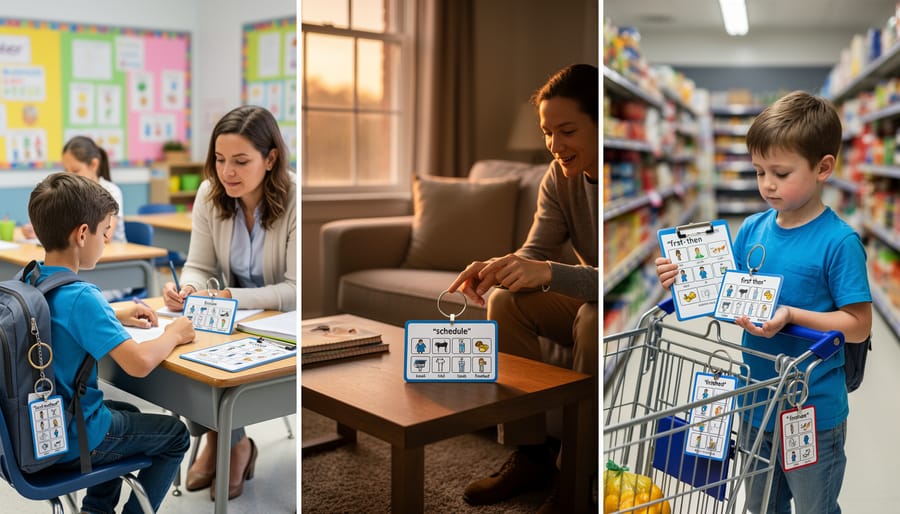
Create portable visual support systems using laminated cards with keyring attachments that travel with the student. For example, a middle school student in Ohio successfully used a portable schedule book across all seven class periods, the resource room, and home, reducing transition-related meltdowns by 65% within three weeks.
Establish communication protocols between educators and families. Weekly photo sharing of classroom visual supports allows parents to recreate similar systems at home. Digital apps like visual schedule builders enable quick updates that sync across devices used in different settings.
Develop a core set of universal symbols and color codes that all environments adopt. When a student’s occupational therapist, classroom teacher, and parents use identical “first-then” boards with matching icons, the student processes expectations faster and experiences less confusion.
Consider creating traveling visual toolkits in zippered pouches containing frequently needed supports: emotion charts, break cards, and choice boards. This ensures students always have familiar visual references regardless of location.
Collaborating with Parents and Support Teams
Successful implementation of visual supports requires collaboration across all environments where students spend their time. Research shows that consistency between home and school increases the effectiveness of visual strategies by up to 40%, making parent partnership essential.
Begin by creating a simple visual support toolkit for families. Share photographs or digital copies of the visuals used at school, along with brief explanations of how and when to use them. For example, if a student uses a first-then board during transitions at school, provide parents with a template they can recreate for morning routines at home. Building a strong relationship with parents creates a foundation for this ongoing collaboration.
Training paraprofessionals and specialists ensures consistent implementation throughout the school day. Hold brief professional development sessions demonstrating proper visual support usage, including wait time after presenting visuals and strategies for fading prompts. One elementary school reported improved outcomes when all staff members, including lunch monitors and bus drivers, learned three core visual supports used with specific students.
Sample Parent Communication Template:
Dear Family,
This week we introduced a visual schedule for [student name] to help with classroom transitions. We’ve seen positive results, including calmer movement between activities and increased independence.
You can support this at home by:
– Using the attached visual sequence for bedtime routines
– Allowing [student name] to check off completed steps
– Celebrating successes with specific praise
Please share any observations about what works well at home. Your insights help us adjust supports for maximum benefit.
Schedule monthly check-ins to review what’s working and adjust strategies. Digital platforms like Google Drive or ClassDojo enable easy sharing of visual supports and video demonstrations. This collaborative approach ensures students receive consistent, coordinated support throughout their day, maximizing skill development and reducing anxiety.
The journey toward supporting students with autism doesn’t require a complete classroom overhaul. Research consistently shows that even a single visual support strategy can reduce anxiety and increase task completion by up to 40% within the first week of implementation. The beauty of visual supports lies in their simplicity and immediate impact—a picture schedule introduced on Monday can transform Tuesday’s transitions.
Start small and build confidence. Choose one strategy that addresses your most pressing classroom challenge: perhaps a visual timer for a student who struggles with time management, or a first-then board for smoother transitions. Observe what works, then gradually expand your visual toolkit based on student responses and needs.
Remember that you’re not just implementing a teaching technique—you’re opening doors to communication, independence, and success for students who process the world differently. Every visual cue you create is an investment in a student’s ability to navigate their environment with greater confidence and reduced stress.
The most powerful changes often begin with the smallest steps. Your commitment to trying just one visual support strategy today can create ripples of progress that extend far beyond your classroom walls. Begin now—your students are ready for the support only you can provide.