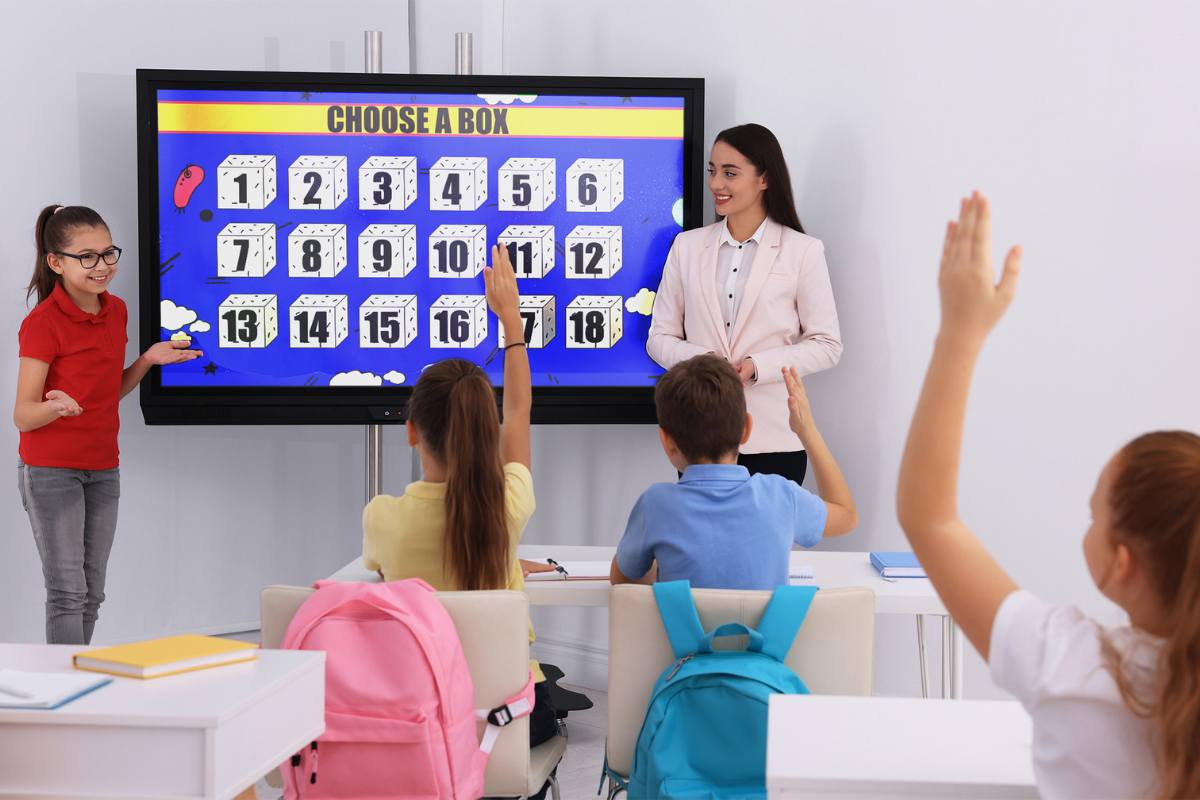



Key Takeaway: Test every link and your projector setup before class, and balance question difficulty across the boxes. Once it works, reuse the same template by swapping in new content.
Tools and Materials You Need for a Mystery Box Game

- Digital setup (about 20 minutes): PowerPoint or Google Slides, plus a projector or interactive whiteboard.
- A question list with 12 to 20 items, mixing easy, medium, and challenging.
- Optional sound effects for correct answers, twists, and bonus boxes.
- Physical setup (about 15 minutes): numbered boxes or envelopes, one per question or challenge.
- Small prizes or point cards to tuck inside the lucky boxes.
- A timer or stopwatch to keep each turn moving.
- A whiteboard or chart paper to track team scores.

Safety and Fairness Warnings Before You Play
A mystery box game runs on suspense, and suspense can backfire if a student feels exposed. The biggest risk is the “lose a turn” box or the question that happens to be far too hard. Keep penalties light and silly rather than punishing: “swap a point with another team” or “do a quick stretch” works better than losing a turn, because nobody sits out and stares at the wall. Let teams confer before answering so no single child carries the pressure of a tough question alone.Warning: Avoid penalty boxes that single out or embarrass a student, check for allergies before using any physical prizes, snacks, or hands-on items, and stop the game right away if anyone becomes upset or the noise gets out of hand.
Competitiveness and noise are the next things to manage. Set a clear signal, such as a raised hand or a chime, that means “voices off,” and agree on it before the first box is picked. Celebrate good teamwork as loudly as correct answers so the game doesn’t turn into a contest of who shouts first. If you use touch-and-feel boxes, supervise every one. Check contents for sharp edges, small choking hazards, and anything that might trigger a reaction, and keep food out of mystery boxes entirely unless you have confirmed every student’s allergies. Pause or end the game when a student is visibly upset, when arguments over points take over, or when the room is too loud to hear the questions. Finish on a high note with a quick recap instead of pushing through. To keep everyone included, rotate who picks the box, use mixed-ability teams, and mix easy and challenging questions across the board so every student gets a chance to contribute.How to Play the Mystery Box Game Step by Step
Start by splitting the class into teams of three to five students, which keeps everyone involved without anyone hiding in the back. For a class of 30, six teams of five works well. Display the numbered box board, then follow the same loop every round.- Divide the class into teams, give each a name, and set up a scoreboard where everyone can see it.
- Decide the turn order. Rotating the “box picker” role within each team makes sure one confident student doesn’t take over.
- The first team picks a number from the board, and you click that box to reveal what’s behind it.
- Read the question or challenge aloud. Give the team 30 to 60 seconds to confer and answer.
- Award points for a correct answer, usually 10 for a standard box. If the team misses, you can offer other teams a quick chance to steal half the points.
- Mark the box as used so it can’t be picked again, then move to the next team.
- Continue until the boxes run out or time is up, then total the scores and announce the winning team.
How to Build a Mystery Box Game in PowerPoint
Building the board yourself takes about 20 minutes once you know the slide order. The walkthrough below shows every click, and the steps underneath give you the same sequence in writing so you can follow along or work offline.- Create a blank deck and make slide 1 your board. Insert a grid of squares (a 4×4 grid of 16 boxes works well) and type a number in each one.
- Add one new slide per box. Put the question or challenge on each and keep the layout identical, since consistent visual aids help students read the board at a glance.
- Go back to slide 1, select box 1, press Ctrl+K (Cmd+K on Mac), choose “Place in This Document,” and pick the matching question slide. Repeat for every box.
- On each question slide, add a small “Return to Board” shape. Link it back to slide 1 the same way, so you never have to exit the slideshow to navigate.
- Swap a few question slides for special outcomes: bonus points, steal a point from another team, or double points on the next answer.
- Add a simple entrance animation, like Fade or Zoom, to the question text, and attach a short sound effect to your bonus and steal slides for extra suspense.
- Hide each box after it’s been used. Select the box, add a Disappear exit animation set “On Click,” or simply cover it with a gray square once played.
Test It and Adapt It: Verifying the Template and Next Steps
Before you teach it live, run the whole game once on your own. Click every box and confirm it opens the right question slide, then check that each “return to board” button lands you back on the main grid. Do this on the classroom projector or interactive whiteboard, not just your laptop, because hyperlinks, sounds and slide transitions sometimes behave differently on school hardware. Skim your question set too, and make sure easy, medium and hard items are spread across the boxes so one team doesn’t get stuck with all the tough ones. Then run a quick pilot round with a few volunteers or a single table group. Watch for confusing wording, boxes that take too long, and moments when students lose interest. Adjust on the spot: shorten the timer, soften a penalty box, or swap a question that fell flat. From there, treat the template as a reusable shell. Drop in questions from your next unit, or ask students to write their own and add the best ones to the board. Building the game into your regular lesson planning keeps review days easy, and a solid lesson planning framework helps you decide where a game like this fits best.Why the Mystery Box Game Works So Well in Classrooms
Part of the appeal is simple suspense. Students don’t know what’s behind the box they pick, so even a routine review question feels like a small gamble, and curiosity keeps them leaning in. That pull works whether you teach second grade or high school. Prep is another big reason teachers stick with it. Once the board is built, you swap in new questions and the same template serves every unit, so repeat use costs you almost nothing. The structure also stretches across subjects: math facts, vocabulary, historical events and science terms all fit behind a numbered box. Engagement spreads across the whole room because teams take turns choosing, and everyone has a stake in the outcome. Twist boxes keep a trailing team in the hunt, which holds attention right to the final round. It’s also one of the easiest educational games to hand to a substitute, since the rules take a minute to explain and the slides do the rest. On review days, it turns a stack of practice questions into something students actually ask to play again.Mystery Box Game Ideas for Different Subjects and Activities
Subject-Specific Mystery Boxes
In math, hide a problem set inside each box, such as one-step equations in some and word problems in others, and award points by difficulty: 1 for basic, 3 for multi-step. Language arts boxes can hold vocabulary words to use in a sentence or a sentence to correct. Social studies boxes work well with map clues or “who am I?” prompts, and language classes can use translation or conjugation challenges. Tally points on the board to keep students engaged through the whole round.Hands-On Mystery Box
Place a few everyday objects, such as a sponge, a key, or a smooth stone, inside an opaque box or sock. Students reach in one at a time, then describe what they feel, guess the item, or use it as a writing prompt. Check for allergies first, avoid sharp or fragile items, and never force a hesitant student to touch anything.Storytelling Mystery Box
Swap the quiz questions for story ingredients. Each box hides a random object, character, or setting, and students draw three, one from each category, then build a short story that uses all of them. Give groups five minutes to plan and one minute to share. A rusty key, a nervous dragon, and a rooftop garden make surprisingly strong prompts. This format works well for writing practice and for building spoken storytelling confidence.Art Challenge Mystery Box
Each box hides a surprise drawing or craft constraint, and students have a short time limit to respond. One might say “draw your favorite animal using only triangles,” another “build a bridge from three paper strips.” Set a five-minute timer, then let students share their work. The tight limits push them past perfectionism and into playful, creative problem-solving.Science Inquiry Mystery Box
Hide a mystery object or phenomenon in each box, such as a magnet, a sealed jar of vinegar and baking soda, or a prism. Students observe, then record at least two questions and one hypothesis before the reveal. Reward careful observation over the “right” answer, so quieter thinkers earn points too. Close with a quick test of their hypotheses.Global Knowledge Mystery Box
Hide a country, culture, or landmark behind each box and reveal clues one at a time, starting with the hardest. Students guess after each clue, and earlier correct guesses earn more points. Try a climate hint, a famous food, then a flag color or a photo of a landmark. This works well for geography, social studies, and world language classes.Musical Mystery Box
Hide a short sound clip, a rhythm to clap back, or a small instrument behind each box. Students might name the piece, copy the beat, or guess the instrument family. Score a right answer as one point, and let teams earn a bonus for matching the rhythm exactly.Mystery Box Game Questions Teachers Ask
Most teachers have the same handful of questions before running this game for the first time. Here are quick answers.How long does one round take?
A full game with eight to twelve boxes usually fits in 20 to 30 minutes. For a short review, play just five or six boxes and save the rest for next time.
How many boxes should I include?
Aim for one or two more boxes than you expect to play, so students always feel they have a choice. Mix in a few bonus or twist boxes, but keep most of the board as plain questions.
Does it work for younger and older students?
Yes. Younger students do well with picture clues, simple questions and lighter twists. Older students enjoy tougher questions, steal boxes and student-written challenges.
Can I run it without a projector?
Absolutely. Number paper envelopes or cups, tape them to the board, and put each question on a card inside. Keep score on the whiteboard and let students pick a number out loud.